
Sharp Time: time tracking for Azure DevOps
Log time on Azure Boards work items and report hours by person, work item and project. Time entries stay in your own Azure DevOps organization. Free for up to 10 people.
What is Sharp Time?
Sharp Time is a time tracking extension for Azure DevOps. People log time on the work item they are working on, see and edit their own entries, and administrators get reports by person, work item and project.
Logged time updates Completed Work and Remaining Work on the work item, so the effort fields and sprint burndown follow the time that was actually spent. When an entry is edited or deleted, the fields change back by exactly what the entry changed.
Your data stays in Azure DevOps. Time entries and settings are stored in Sharp Time’s data storage in your own organization, and Sharp Time has no server of its own.
How do I track time in Azure DevOps?
Install Sharp Time from the Visual Studio Marketplace into your Azure DevOps organization. Everyone in the organization can then log time, and no setup is needed.
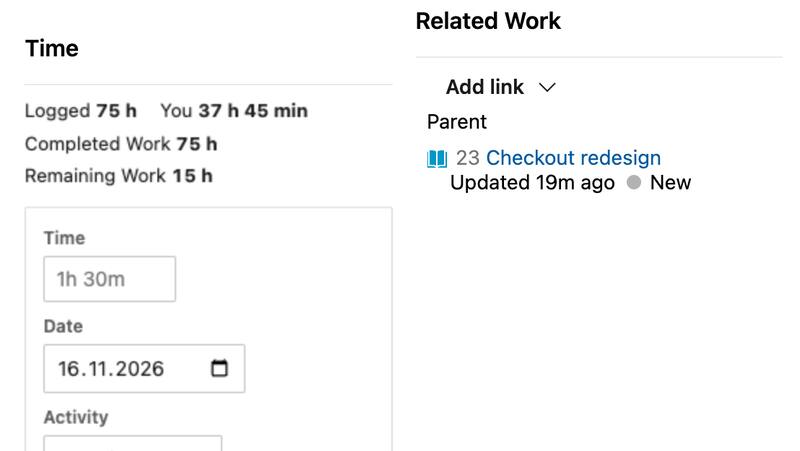
- Open a work item. The Time section shows the time logged on it and a short form.
- Type the time as
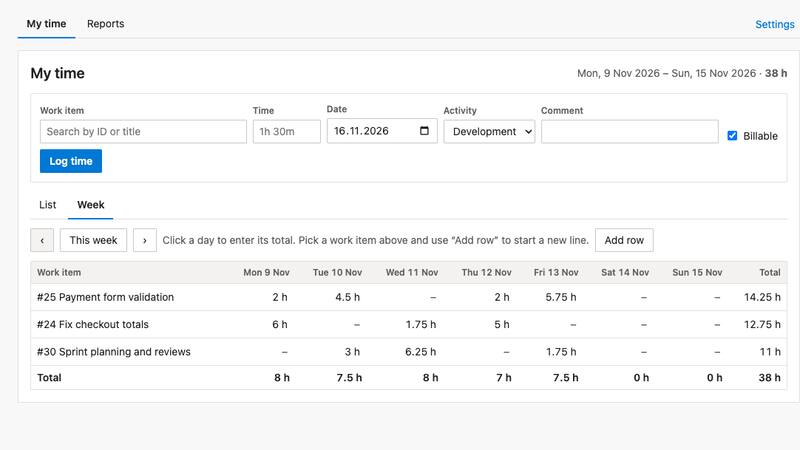
1h 30m,1.5or90m, pick the date and activity, add a comment if you like and select Log time. Completed Work and Remaining Work are updated. - See your week: in Boards, open Sharp Time. My time lists your entries by day, and the week view lets you type a day’s total straight into a cell.
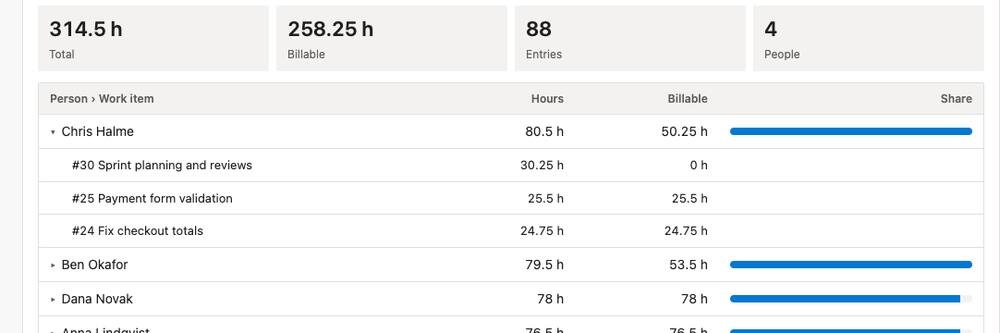
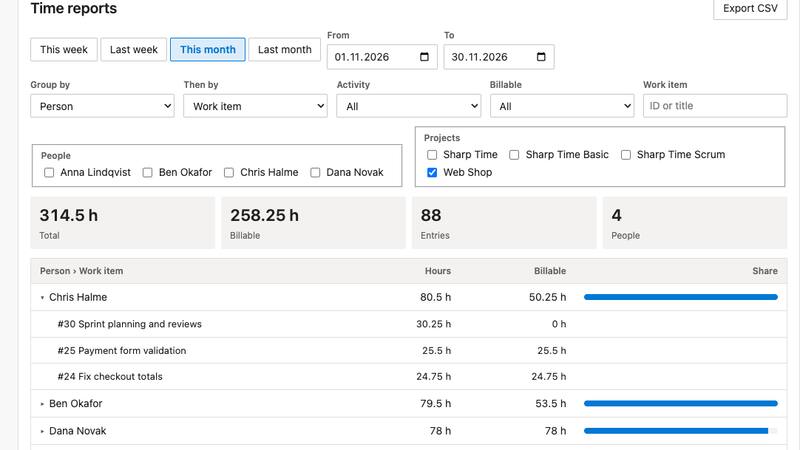
- Report: the Reports tab groups hours on two levels for any date range and exports them to CSV.
Features
Time on every work item
A Time section on the work item form: time, date, activity, comment and billable. You can edit and delete your own entries.
Completed and Remaining Work stay right
Logged time adds to Completed Work and subtracts from Remaining Work, never below zero. Scrum tasks have no Completed Work field, so Sharp Time keeps the total itself.
My time and the week view
Your entries by day for this week, last week, this month or any range, and a week grid where you type a day’s total into a cell.
Reports on two levels
Group hours by person, work item, parent, project, day, week, month, activity or billable, and then by a second level. Filter by people, projects, activity and billable.
CSV export
Export the entries in a report as a CSV file that opens in Excel.
Administrators see everyone's time
Team members see their own time. Project Collection Administrators, and the people and groups you add, see and edit everyone’s entries.
Your rules
Choose the activities, rounding up to 5, 15 or 30 minutes, whether entries are billable by default, which work item types can be logged and whether Remaining Work changes.
Data stays in your organization
Time entries and settings are stored in your Azure DevOps organization. Sharp Time has no server of its own, and we don’t receive your data.
Pricing
Up to 10 people
Free. Only people who logged time in the last 30 days count.
30-day free trial
Starts when an 11th person logs time.
11 people or more
USD 4 per person per month, billed yearly (USD 48 per person a year). Prices exclude tax.
A licence covers everyone who logs time. People who only read reports or open work items don’t count. Licences are sold by Paddle, our reseller and merchant of record, which handles payment, invoicing and taxes. You can get a full refund within 30 days of your first purchase. Customers on the free plan get the same support as paying customers.
Screenshots
Frequently asked questions
How much does Sharp Time cost?
It is free for an organization where at most 10 people have logged time in the last 30 days. Larger teams get a 30-day free trial, and after that the price is USD 4 per person per month, billed yearly. Prices exclude tax.
Who counts as a person in the licence?
Everyone who has logged time in the last 30 days. People who only read reports or open work items don’t count.
Where are the time entries stored?
In Sharp Time’s data storage in your own Azure DevOps organization. We don’t receive them. Completed Work and Remaining Work are written to your work items, and each change shows in the work item history.
How does Sharp Time change Completed Work and Remaining Work?
Logged time is added to Completed Work and subtracted from Remaining Work, never below zero. When you edit or delete an entry, the fields change back by exactly what the entry changed. An administrator can choose that Remaining Work is never changed.
Which work item types and processes does it support?
Time can be logged on any work item type. Completed Work and Remaining Work are updated when the type has them. Scrum tasks have no Completed Work field, so Sharp Time keeps the total itself and only changes Remaining Work. An administrator can limit logging to selected types.
Who can see whose time?
Team members see their own time. Project Collection Administrators, and the people and groups added as administrators in the settings, see and edit everyone’s entries. Azure DevOps doesn’t offer per-person permissions for extension data, so a member who uses the Azure DevOps API directly can read the stored entries.
What happens if the licence is missing or too small?
People can still log time, and the Time section on work items works as usual. The My time and Reports pages show a request to get a licence instead of the results.
How do I get the licence key?
Buy a licence from Organization settings, Sharp Time, Buy a licence. The key comes by email right after payment. Paste it in Licence key and select Save licence key.
Can I get a refund?
Yes. You can cancel your first purchase within 30 days and get a full refund.
Does Sharp Time work on Azure DevOps Server?
No. Sharp Time works in Azure DevOps Services, the cloud version.
Support and terms
Support: support@hdsoft.fi, Monday to Friday 9:00–17:00 Finnish time, in English and Finnish. Response times and security reports are on the support page.
Documentation: how to use Sharp Time.
Terms: end user licence agreement and refund policy.
Privacy: privacy policy.
Sales: myynti@hdsoft.fi. HD SofT Oy, business ID 3318598-8, Finland.
Coming to the Visual Studio Marketplace
Sharp Time is coming to Azure DevOps through the Visual Studio Marketplace. The documentation already shows how it works.
Azure DevOps and Visual Studio are trademarks of the Microsoft group of companies. Sharp Time is made and supported by HD SofT.