
AI Universal Search: ask Odoo in your own words
Type a question the way you would ask a colleague, for example “how much did the online shop sell in September”. You get the answer as a table, a chart or a report. A free Odoo AI app for Odoo 18, 19 and 20.
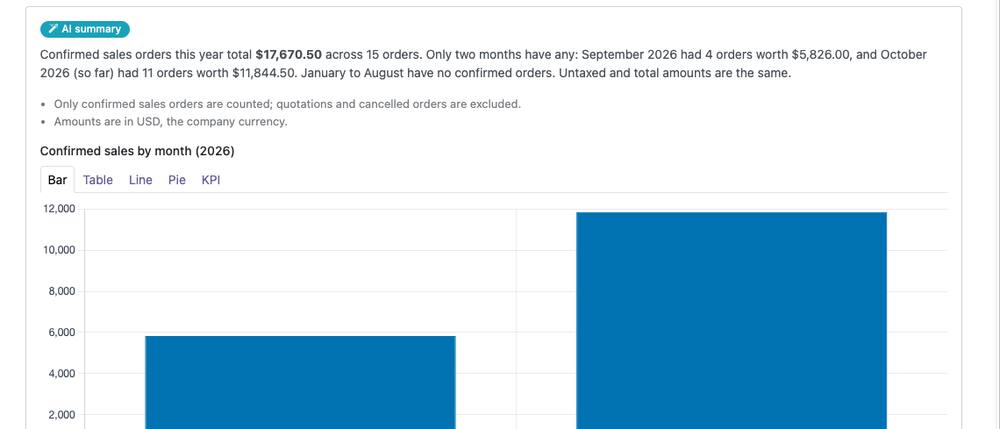
What is AI Universal Search?
AI Universal Search is a free AI app for Odoo. Anyone can ask about the company’s data in their own words, without building reports or doing Excel tricks.
The question can be about sales, customers, invoices, stock, projects or anything else you have in Odoo. The app finds the answer in the data the person asking is allowed to see in Odoo, and shows it as a short summary with a table or a chart.
The AI only reads data. It never changes, adds or deletes anything. The administrator decides how much data may be sent to the AI.
How does it work?
- Ask in your own words, in any language, for example “open opportunities by stage” or “top 10 products this year”.
- The app finds the answer in your Odoo data with your access rights. You only see what you could see in Odoo anyway.
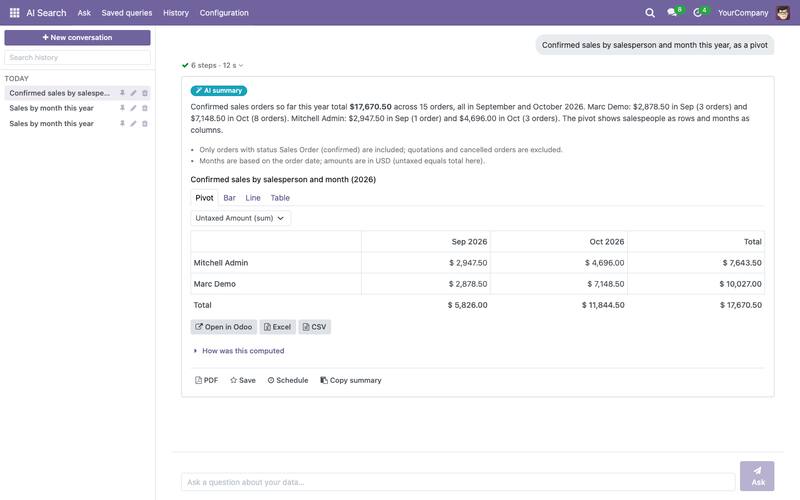
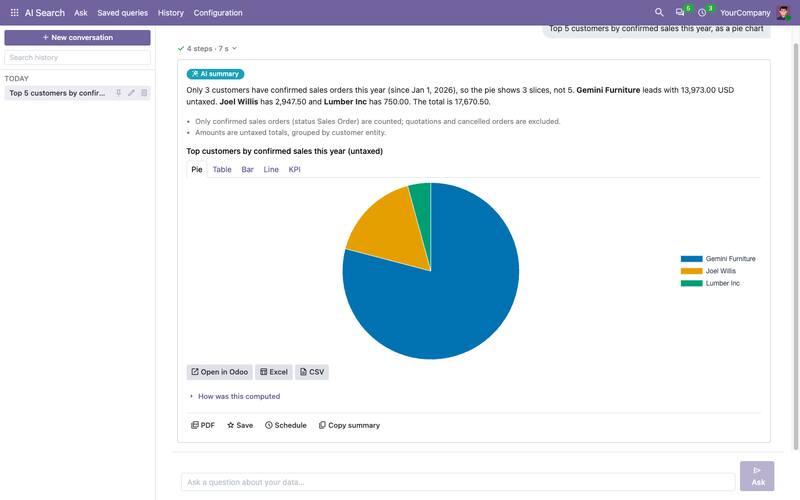
- You get a summary and the numbers as a table, a bar, line or pie chart, a pivot table or KPI figures.
- Check and continue: see how the number was calculated, open the same records in Odoo, export to Excel or save the question for later.
Features
Every Odoo app
Ask about Sales, CRM, Invoicing, eCommerce, Inventory, Point of Sale, Project, Purchase, Employees or Manufacturing. The app looks at what data your own Odoo has, so it also works with third-party and custom modules.
Answers you can check
“How was this computed” explains in plain words which data and filters the answer used. “Open in Odoo” shows the same records in the normal Odoo views.
Charts and pivot tables
The same answer as a table, a bar, line or pie chart, a pivot table or KPI figures. Switch the view with one click.
Excel, CSV and PDF
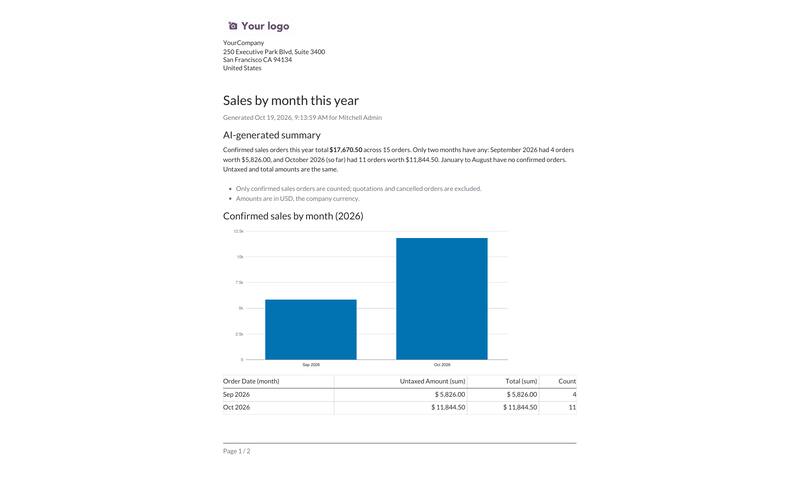
Export the result to Excel or CSV. The PDF report uses your company layout and includes the chart, the table and a summary written by the AI.
Save and schedule
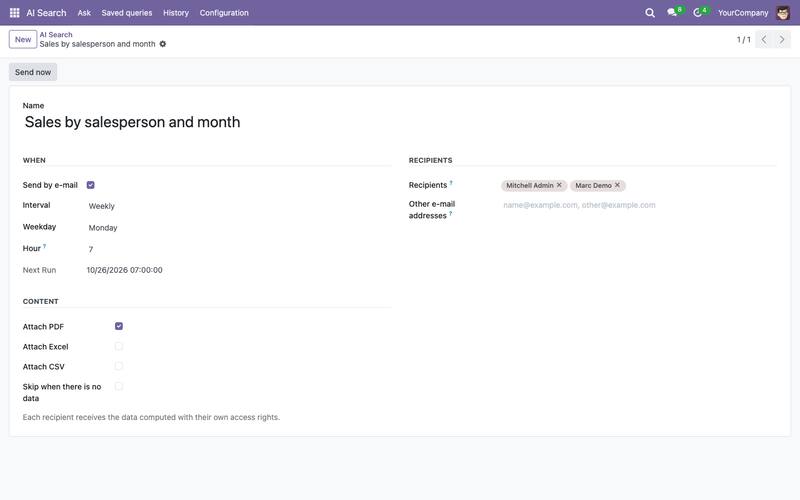
A saved question always shows current numbers. Send it by e-mail daily, weekly or monthly with a PDF, Excel or CSV attachment.
Read-only
The AI never changes your Odoo data. It does not add, edit or delete anything.
Your own access rights
Everyone sees only what they can see in Odoo anyway. A scheduled report is also computed for each recipient with their own rights.
On the phone, in 58 languages
Works on phones and computers. The interface is translated into 58 languages.
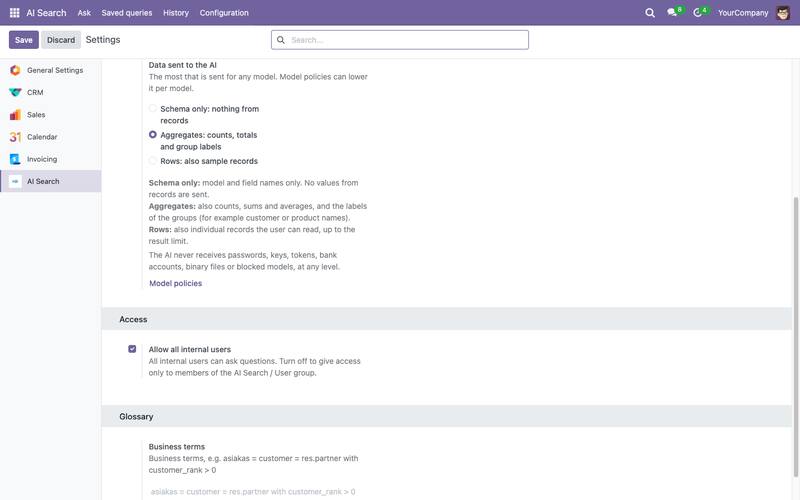
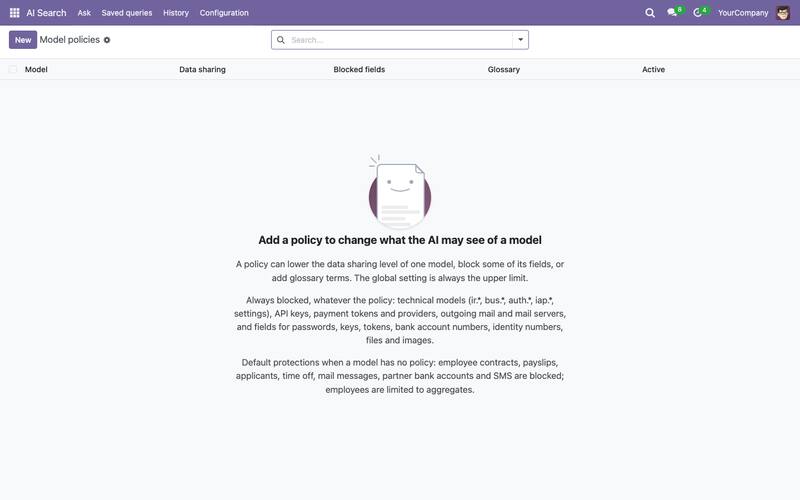
You decide what the AI sees
Blocked
The AI sees nothing from this data. You can block a whole type of data or a single detail, for example a customer’s phone number.
Structure only
The AI only learns what kind of data Odoo has, for example that an order has a date and an amount. It does not see the numbers or names.
Totals only (default)
The AI sees totals and group names, for example sales by customer. Single records are not sent to it.
Records too
The AI also sees single records the person asking is allowed to read. Choose this level only when you need it.
The level can be set separately for each type of data. Salaries, payslips, time off, bank accounts and messages are protected by default. Passwords, keys and other secrets are never sent to the AI.
Screenshots
Frequently asked questions
How much does AI Universal Search cost?
The app is free and open source (LGPL-3). The AI usage is billed by OpenRouter directly to your company’s own account. The cost depends on the AI model you choose and on how many questions you ask.
Can the AI change or delete Odoo data?
No. AI Universal Search only reads data. It does not add, edit or delete anything.
Can a user see data they have no access to?
No. Every question runs with the Odoo access rights of the person asking, so the answer only contains data they can already see in Odoo.
Is company data sent to the AI service?
The administrator decides. By default only totals, counts and group names are sent, not single records. Salaries, time off, bank accounts and messages are protected by default, and passwords are never sent.
Does AI Universal Search work on Odoo Online?
No. Odoo Online does not allow third-party apps that contain their own program code, and this app does. It works on Odoo.sh and on Odoo installed on your own server: versions 18, 19 and 20.
Can I use ChatGPT with it?
The app uses OpenRouter, where the administrator chooses the AI model. The choice includes OpenAI’s GPT models, the same technology ChatGPT uses.
Which Odoo apps can I ask about?
All installed apps, including third-party and custom modules. We tested it on 19 Oct 2026 with Odoo’s demo data in Sales, CRM, Invoicing, eCommerce, Inventory, Point of Sale, Project, Purchase, Employees and Manufacturing and checked the answers against the database.
Are favorites and reports from the old version kept?
Yes. When you update from version 0.3 to 1.0, favorites and reports become saved queries. Ask them once again to make them run on the new version.
Technical details
Odoo versions: 18.0, 19.0 and 20.0. Odoo.sh and self-hosted, not Odoo Online.
Requirements: Odoo base modules (base, web, mail) and the Python packages requests and xlsxwriter. The server needs a connection to openrouter.ai.
AI service: your company’s own OpenRouter account and its API key, the code Odoo uses to access the account. Choose a model that supports tool calling.
Security: queries go through Odoo’s own data layer (ORM) with the access rights and record rules of the person asking. Nothing is written to the database.
Version and license: 1.0, LGPL-3. Questions and bug reports: support@hdsoft.fi.