
Kotivahti
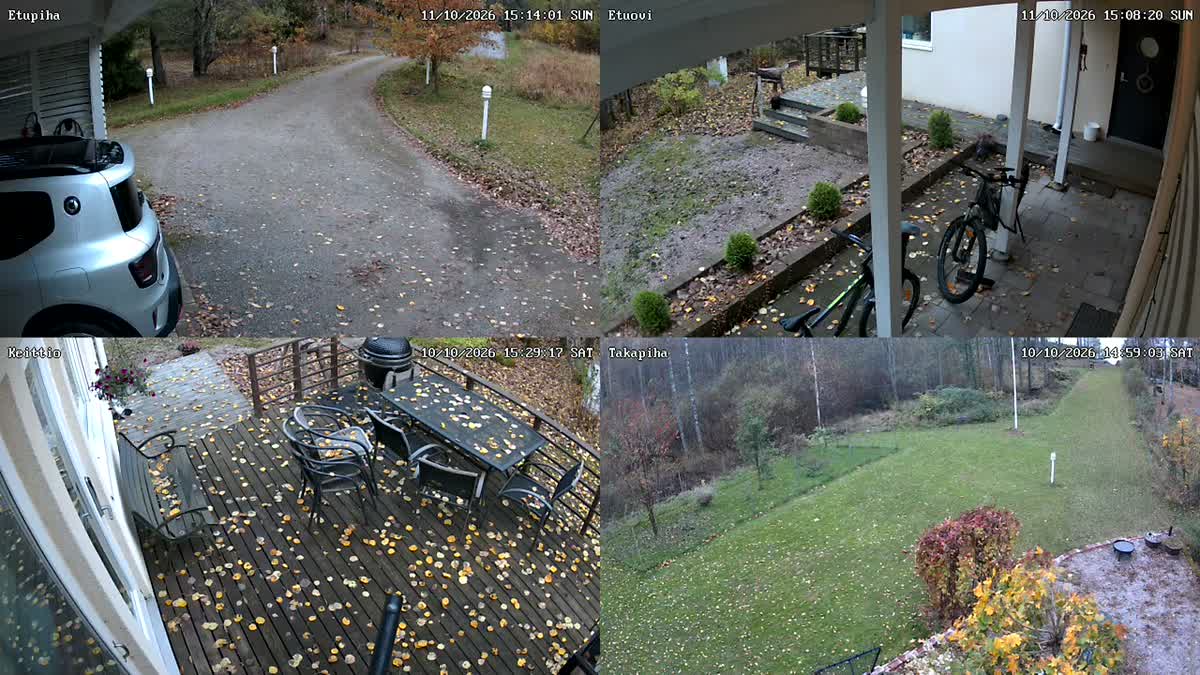
Watch the security cameras and NVRs on your home network on your TV. Free, no account and no cloud: the video goes straight from the camera to the TV. Works with Reolink and ONVIF cameras.
Product description
Kotivahti shows the security cameras and NVRs on your home network on your TV. The video comes straight from the camera or recorder over your home network. It never goes through HD SofT or any other cloud service.
When you open the app on the TV, it searches your home network for Reolink cameras and NVRs. Sign in with the same user name and password you use in the Reolink app, and the cameras appear in a grid with the names read from the device. On Google TV and Apple TV you add cameras of other brands by IP address over ONVIF.
The grid uses the light sub stream, and full screen switches to the main stream. On TVs that decode HEVC video, full screen is in 4K. You can rename, hide and reorder the cameras. Demo mode lets you try the app without a camera of your own.
Kotivahti is coming to Google TV and Android TV, Apple TV, and LG and Samsung TVs. The app is in English, Finnish, Swedish, Norwegian, Danish, German, French, Dutch and Polish.
Features
Finds Reolink by itself
The search goes through your home network and finds Reolink cameras and NVRs. Camera names are read from the device.
Other brands over ONVIF
On Google TV and Apple TV you can add an ONVIF camera by IP address, for example TP-Link Tapo. The LG and Samsung versions support Reolink for now.
Grid and full screen
The grid shows the light sub stream; full screen shows the main stream with sound. 4K HEVC works on TVs that can decode it.
No account, no cloud
The video goes over your home network straight from the camera to the TV. No account is needed, and the video never goes through an HD SofT server.
Passwords encrypted
Device passwords are stored encrypted, only on the TV. Passwords are never in the diagnostics log.
Your names and order
Rename the cameras, hide them from the grid and put them in the order you want.
Demo mode
Try the app with four recorded cameras, without a camera of your own.
Free
Kotivahti is free. It shows ads for HD SofT’s own products, and the ads never cover the camera view.
Frequently asked questions
Do I need an account or a cloud service?
No. Kotivahti connects straight to the camera or recorder on your home network. The internet is needed only for the ads, the demo videos and sending a diagnostics log. The cameras work without it.
Can HD SofT see my camera video?
No. The video goes from the camera or recorder straight to the TV and never through an HD SofT server. Device passwords are stored encrypted, only on the TV.
Which cameras work?
Reolink cameras and NVRs work on all platforms. On Google TV and Apple TV, ONVIF cameras such as TP-Link Tapo work too. Reolink battery cameras are shown through a Home Hub or an NVR.
Why do I have to turn on RTSP in Reolink?
Apple TV plays Reolink video over RTSP, and Google TV gets the best quality with it. New Reolink devices have RTSP off by default. Turn it on in the Reolink app: Settings → Network → Advanced → Server Settings. Kotivahti tells you when RTSP is off.
How do I add a TP-Link Tapo camera?
Create a camera account in the Tapo app (camera → Advanced Settings → Camera Account). Then add the camera in Kotivahti by IP address and sign in with the camera account. This works on Google TV and Apple TV.
Does Kotivahti work away from home?
No. Kotivahti shows the cameras that are on the same network as the TV.
Why are there ads in the app?
Kotivahti is free. The ads are for HD SofT’s own apps and games, and the app has no other ad networks. An ad never covers the camera view, and its QR code opens the product page on your phone.
When will Kotivahti be available?
Kotivahti is coming to Google Play, the App Store, the LG Content Store and the Samsung app store. We will add the download links to this page when the app is in the stores.
Support
Questions and bug reports: support@hdsoft.fi.
If something does not work, open Settings → Diagnostics in the app, write briefly what happened and choose Send the log to HD SofT. You get a code (KV-…) that you can mention in your email. Passwords are never in the log.
Privacy: Kotivahti privacy policy.
Your security cameras on the living-room TV
Kotivahti is coming soon to Google TV, Apple TV, and LG and Samsung TVs.
Kotivahti is not an official Reolink or TP-Link app. Kotivahti is made by HD SofT Oy. Reolink, TP-Link and Tapo are trademarks of their owners.